 RAZKOM
See what a program talks to.
Wireshark shows everything on the wire and leaves you to work out which process sent it. Resource Monitor tells you the process and not much else. BeaconTap does both at once: pick a program, and it follows that program and every child it spawns, showing which hosts they reach, over what, how much and when.
01how it works
- Run
beacontap.exeas administrator. If you forget, it offers to relaunch itself. - Click Choose target… and pick a running process, or use Launch & watch on an exe. It starts suspended, so you don't miss its very first connection.
- Use the program and watch the tree and the Connections tab fill in.
- Optional: turn on the packet layer for better host names and a pcapng, then Export… when you're done.
Process and network events come from Event Tracing for Windows, which Windows only hands to administrators. BeaconTap never sends anything over the network itself.
02what it shows
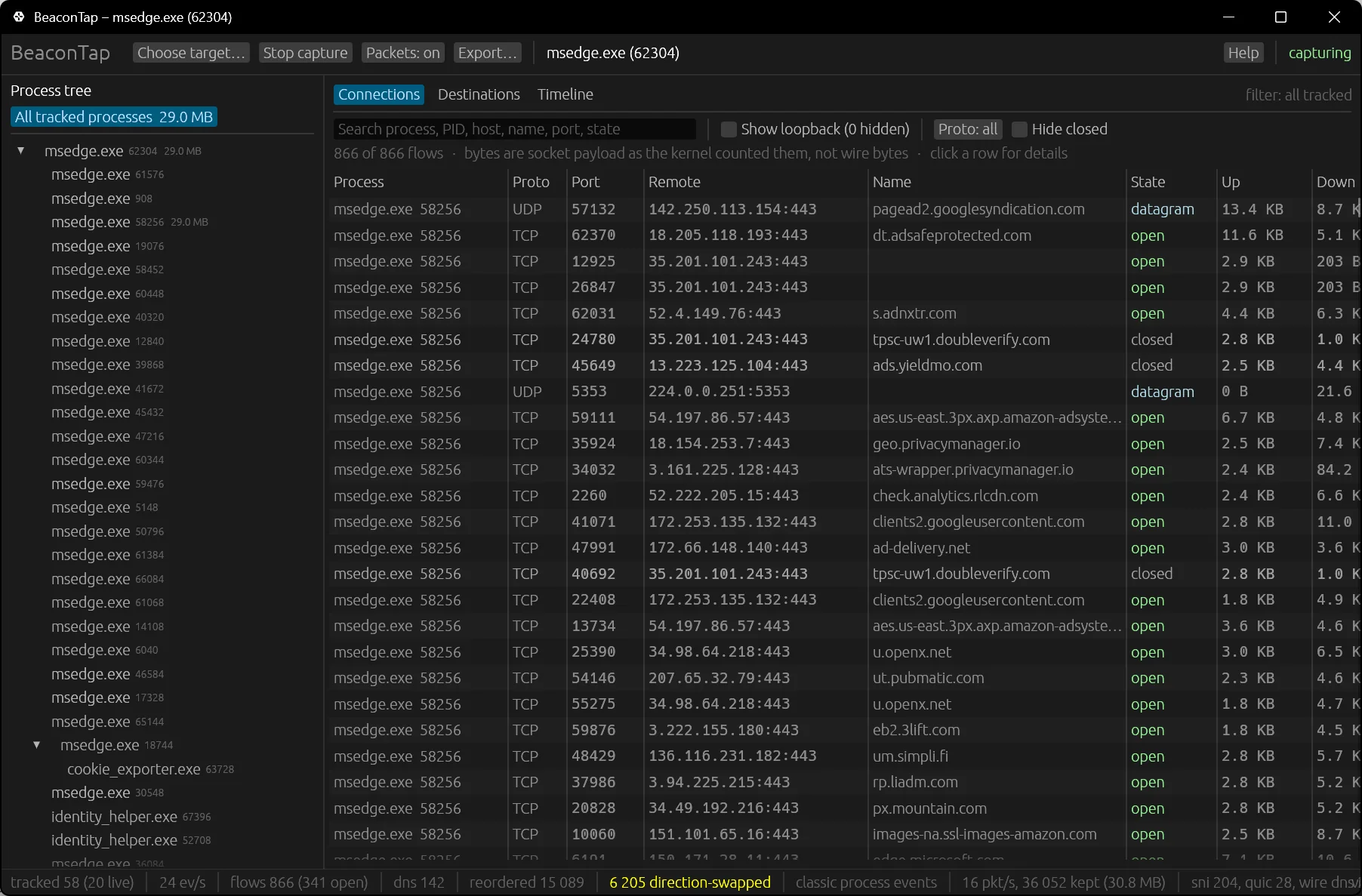
Live process treeBuilt from kernel events, so short-lived helpers show up too, with their command lines.
ConnectionsEvery TCP and UDP flow: remote host, state, bytes each way, first and last seen.
DestinationsFlows grouped by site or domain, so you see at a glance that a “simple” app talks to eleven companies.
TimelineBytes per second for the whole tree and for each process.
Real host namesFrom the Windows DNS client, plus TLS and QUIC server names with the packet layer on. DNS-over-HTTPS resolvers are tagged.
ExportsConnections and destinations as CSV, the session as JSON, packets as pcapng with the owning process on every frame.
03build & run
cargo build --release             # Rust 1.95+
target\release\beacontap.exe

beacontap --attach 1234             # watch a running process
beacontap --launch app.exe --packets  # launch suspended, packet layer on
beacontap --headless --attach 1234 --duration 60 --out C:\captures
Headless mode captures until the process tree exits (or --duration runs out) and writes JSON, both CSVs and the pcapng to --out, for scripts and CI.
04spec
| platform | Windows 10 1809+ and 11, x64 |
| stack | Rust + egui, Event Tracing for Windows |
| install | Build from source, single exe, no installer |
| exports | CSV, JSON, pcapng (opens in Wireshark) |
| admin needed | Yes, for the kernel event sessions |
| telemetry | None |
| license | MIT |
| cost | Free |